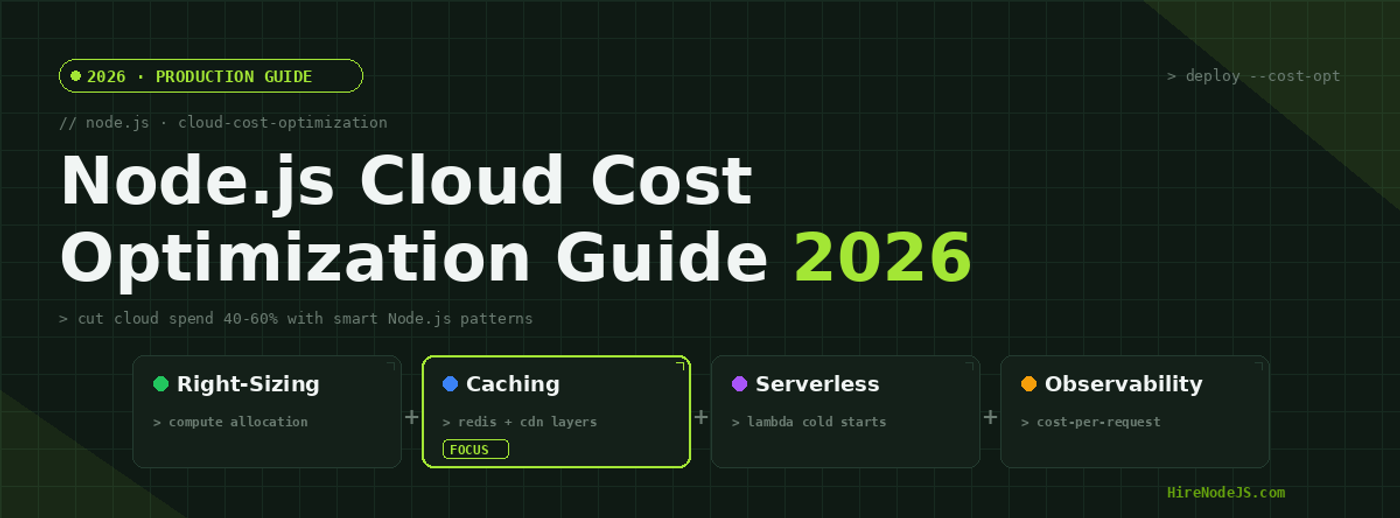
Node.js Cloud Cost Optimization: Cut Spend by 60% in 2026
Cloud infrastructure costs are the silent killer of Node.js startups and scale-ups alike. In 2026, the average mid-size Node.js application running on AWS or GCP spends between $8,000 and $15,000 per month on infrastructure — and at least 40% of that spend is waste. Oversized EC2 instances running at 12% CPU utilization, uncached database queries firing thousands of times per minute, and Lambda functions with bloated memory allocations all contribute to a bloated cloud bill that grows faster than your revenue.
The good news: with the right patterns and a disciplined approach, most Node.js teams can cut their cloud spend by 40–60% without sacrificing performance or reliability. This guide walks through every major optimization strategy — from compute right-sizing and caching layers to serverless migration and cost observability. Whether you are managing infrastructure yourself or looking to hire Node.js developers with deep cloud expertise, these patterns will transform how your team thinks about infrastructure spend.
Understanding Node.js Cloud Cost Drivers
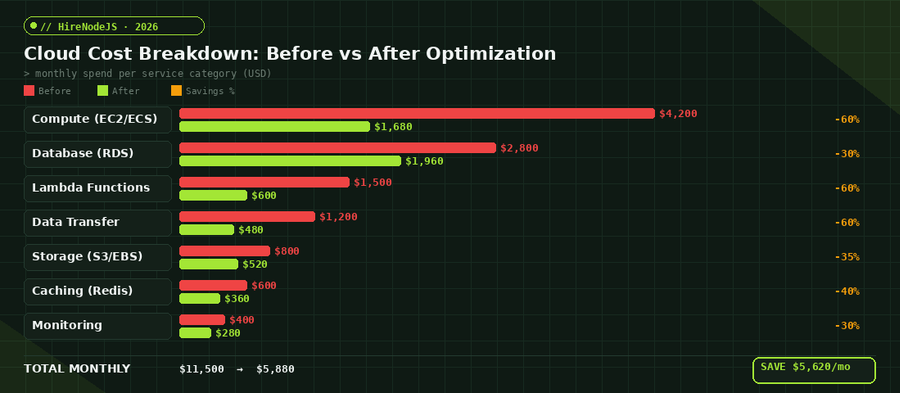
Before optimizing, you need to understand where the money actually goes. Most Node.js applications follow a predictable cost distribution pattern: compute accounts for roughly 35–40% of total spend, databases take 20–25%, data transfer and networking consume 10–15%, and the remainder splits between storage, caching, and monitoring services.
The Compute Trap
Node.js is single-threaded by default, which means a t3.2xlarge instance with 8 vCPUs is dramatically over-provisioned for most API workloads. The event loop handles I/O concurrency beautifully, but it cannot utilize multiple cores without worker threads or clustering. Teams often provision based on memory requirements or traffic spikes without considering that Node.js CPU utilization rarely exceeds 30% on multi-core instances.
Database Over-Provisioning
RDS instances are the second-largest cost center. A db.r6g.xlarge running 24/7 costs over $2,800 per month, yet most read-heavy Node.js applications could serve 80% of their queries from a Redis cache. The pattern is simple: cache aggressively, use read replicas for analytics queries, and reserve instances for predictable workloads.
Compute Right-Sizing and Auto-Scaling
Right-sizing is the single highest-impact optimization you can make. It requires no code changes, no architectural refactoring — just a disciplined review of your actual resource utilization against what you are paying for.
CPU and Memory Profiling in Production
Start by enabling detailed CloudWatch metrics with 1-minute granularity across all your ECS tasks or EC2 instances. Look at P95 CPU and memory utilization over a 30-day window. If your P95 CPU is below 40%, you are almost certainly over-provisioned. For Node.js applications running on ECS Fargate, switching from 2 vCPU / 4 GB to 1 vCPU / 2 GB can cut your compute bill in half while handling the same request volume.
Target Tracking Auto-Scaling
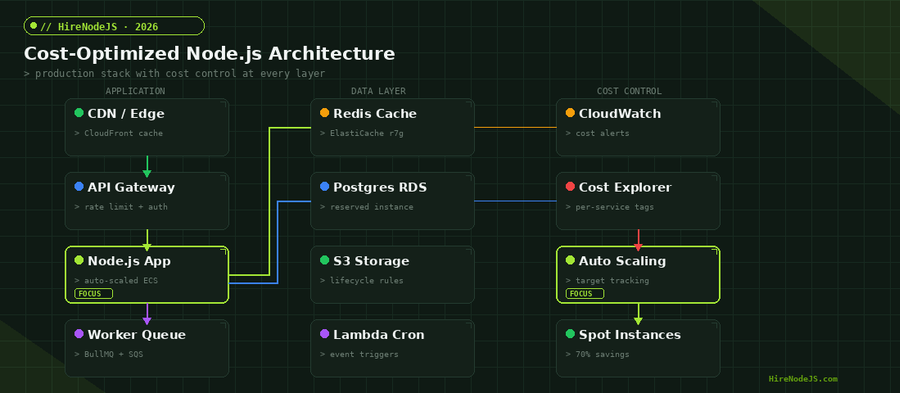
Static instance counts are the enemy of cost efficiency. Configure ECS Service Auto Scaling with target tracking policies: set CPU target at 65% and memory target at 70%. This ensures you scale out during traffic peaks and scale in during quiet hours. For Node.js APIs with predictable traffic patterns, combine target tracking with scheduled scaling to pre-warm capacity before known peaks.
Caching Strategies That Slash Database Costs
Caching is the most reliable way to reduce both database costs and response latency simultaneously. A well-implemented Redis caching layer can absorb 70–90% of read traffic, allowing you to downsize your RDS instance significantly.
Multi-Layer Cache Architecture
The optimal caching strategy for Node.js applications uses three layers: in-memory application cache (using node-cache or lru-cache) for hot data with sub-millisecond access, Redis for shared cache across multiple instances with 1–2ms latency, and CDN edge caching for static and semi-static API responses. Each layer reduces load on the next, creating a cascading cost reduction.
Cache Invalidation Patterns
The hardest part of caching is invalidation. For most Node.js APIs, a time-based TTL strategy works well: set short TTLs (30–60 seconds) for frequently changing data and longer TTLs (5–15 minutes) for reference data. For real-time consistency requirements, use Redis pub/sub to broadcast invalidation events across all application instances.
import Redis from 'ioredis';
import { LRUCache } from 'lru-cache';

const redis = new Redis(process.env.REDIS_URL);

// L1: In-memory LRU cache (per-instance, 5s TTL)
const localCache = new LRUCache({
  max: 1000,
  ttl: 5000, // 5 seconds
});

// L2: Redis shared cache (60s TTL)
async function getCached(key, fetcher, ttl = 60) {
  // Check L1 first
  const local = localCache.get(key);
  if (local) return local;

  // Check L2 (Redis)
  const cached = await redis.get(key);
  if (cached) {
    const parsed = JSON.parse(cached);
    localCache.set(key, parsed); // Promote to L1
    return parsed;
  }

  // Cache miss — fetch from database
  const fresh = await fetcher();
  await redis.setex(key, ttl, JSON.stringify(fresh));
  localCache.set(key, fresh);
  return fresh;
}

// Usage: reduces DB queries by ~85%
app.get('/api/products/:id', async (req, res) => {
  const product = await getCached(
    `product:${req.params.id}`,
    () => db.products.findById(req.params.id),
    120 // 2-minute TTL
  );
  res.json(product);
});
Serverless Optimization for Node.js Lambda Functions
AWS Lambda is often sold as the ultimate cost saver, but poorly configured Lambda functions can actually cost more than equivalent ECS tasks. The key optimizations are memory tuning, cold start reduction, and execution time minimization.
Memory-Power Tuning
Lambda allocates CPU proportionally to memory. A 128 MB function gets a fraction of a vCPU, while a 1769 MB function gets a full vCPU. For CPU-bound Node.js operations like JSON parsing or cryptographic operations, doubling the memory from 256 MB to 512 MB can cut execution time by 60%, resulting in a net cost reduction despite the higher per-millisecond rate.
Hire Pre-Vetted Node.js Developers
Skip the months-long search. Our exclusive talent network has senior Node.js experts ready to join your team in 48 hours.
Cold Start Elimination
Provisioned concurrency eliminates cold starts but adds a fixed cost. A smarter approach for most Node.js serverless applications is to use Lambda SnapStart (now available for Node.js runtimes in 2026), which snapshots the initialized function state and restores it in under 200ms. Combined with lazy-loading your dependencies and keeping your deployment package under 5 MB, cold starts drop from 800ms to under 100ms.
Data Transfer and Storage Cost Reduction
Data transfer costs are the most overlooked line item on AWS bills. Every byte that leaves an AWS region costs money, and Node.js applications that serve large JSON payloads or stream media files can rack up thousands in monthly transfer fees.
Response Compression and Payload Optimization
Enable Brotli compression on all API responses — it achieves 20–30% better compression ratios than gzip for JSON payloads. For Node.js applications using Express or Fastify, this is a one-line middleware addition. Also audit your API responses for over-fetching: returning 50 fields when the client needs 5 wastes bandwidth and increases serialization time.
S3 Lifecycle Policies
Most Node.js applications store uploads, logs, and backups in S3 without any lifecycle management. Configure S3 Intelligent-Tiering for unpredictable access patterns, or explicit lifecycle rules to transition objects to S3 Glacier after 90 days and delete after 365 days. For log storage, use S3 Express One Zone for hot logs (7 days) then transition to standard S3.
Cost Observability and Governance
You cannot optimize what you cannot measure. Building cost observability into your Node.js application from day one prevents runaway spend and gives engineering teams the data they need to make informed trade-offs.
Per-Service Cost Tagging
Tag every AWS resource with at minimum: service name, environment, team, and cost center. Use AWS Cost Allocation Tags to break down your monthly bill by service. This transforms a single $11,500 invoice into an actionable breakdown showing exactly which microservice or feature is driving costs.
Automated Cost Alerts
Configure AWS Budgets with anomaly detection to alert when daily spend exceeds 120% of the trailing 7-day average. For per-service alerting, use CloudWatch custom metrics to track cost-per-request by endpoint. This catches cost regressions early — a new database query without proper indexing, a logging change that doubles CloudWatch Logs ingestion, or a cache TTL misconfiguration that increases RDS query volume.
Reserved Instances and Savings Plans
For predictable baseline workloads, Reserved Instances and Savings Plans offer 30–72% discounts compared to on-demand pricing. The key is separating your baseline load (which should be reserved) from your burst capacity (which should use on-demand or spot instances).
Compute Savings Plans vs Reserved Instances
Compute Savings Plans are more flexible than Reserved Instances because they apply across instance families, regions, and even between EC2 and Fargate. For Node.js teams running on ECS Fargate, a 1-year Compute Savings Plan with no upfront payment typically saves 20% while maintaining full flexibility to change instance types. For stable RDS workloads, Reserved Instances with partial upfront payment offer 40% savings.
Spot Instances for Non-Critical Workloads
Spot instances offer up to 90% savings but can be interrupted with 2 minutes notice. They work excellently for Node.js worker processes, batch jobs, and background queue consumers. Use ECS capacity providers to automatically mix on-demand (for your API servers) and spot (for workers). If you need engineers who understand these patterns deeply, HireNodeJS connects you with pre-vetted senior developers who have production experience with cost-optimized architectures.
Hire Expert Node.js Developers — Ready in 48 Hours
Building the right system is only half the battle — you need the right engineers to build it. HireNodeJS.com specialises exclusively in Node.js talent: every developer is pre-vetted on real-world projects, API design, event-driven architecture, and production deployments.
Unlike generalist platforms, our curated pool means you speak only to engineers who live and breathe Node.js. Most clients have their first developer working within 48 hours of getting in touch. Engagements start as short-term contracts and can convert to full-time hires with zero placement fee.
Conclusion: Build a Cost-Conscious Engineering Culture
Cloud cost optimization is not a one-time project — it is an ongoing engineering discipline. The strategies in this guide, applied methodically, can reduce your Node.js infrastructure spend by 40–60% while maintaining or even improving application performance. Start with the highest-impact changes: right-size your compute instances, implement a multi-layer caching strategy, and set up cost observability dashboards.
The teams that consistently keep cloud costs under control are the ones that treat infrastructure spend as a first-class engineering metric, right alongside latency and error rates. Whether you are building this capability in-house or looking to hire backend developers with cloud optimization experience, the investment pays for itself within the first month.
Frequently Asked Questions
How much can you save by optimizing Node.js cloud infrastructure?
Most Node.js applications can reduce cloud spend by 40-60% through a combination of compute right-sizing, multi-layer caching, serverless tuning, and reserved instance purchases. The median savings for a $10,000/month workload is around $5,000/month.
What is the fastest way to reduce Node.js AWS costs?
The fastest impact comes from right-sizing compute instances. Use AWS Compute Optimizer to identify over-provisioned EC2 or ECS tasks. Most teams see 20-30% savings within the first week with zero code changes.
Does caching really reduce cloud costs significantly?
Yes. A properly implemented Redis caching layer absorbs 70-90% of database read queries, allowing you to downsize expensive RDS instances. This typically saves $800-2,000/month for mid-size applications.
Are spot instances safe for production Node.js APIs?
Spot instances should not serve user-facing API traffic directly, but they are excellent for background workers, queue consumers, and batch processing. Use ECS capacity providers to automatically mix on-demand and spot instances based on workload type.
How do I monitor Node.js cloud costs in real time?
Set up AWS Cost Explorer with daily granularity, configure AWS Budgets with anomaly detection alerts, and implement custom CloudWatch metrics to track cost-per-request by service. Weekly cost review meetings help catch regressions early.
Should I migrate my Node.js API to serverless to save money?
It depends on your traffic pattern. Serverless works best for sporadic or event-driven workloads. For consistently high-traffic APIs (above 1M requests/day), containerized deployments on ECS with auto-scaling are typically more cost-effective than Lambda.
Vivek Singh is the founder of Witarist and HireNodeJS.com — a platform connecting companies with pre-vetted Node.js developers. With years of experience scaling engineering teams, Vivek shares insights on hiring, tech talent, and building with Node.js.
Need a DevOps-Savvy Node.js Engineer?
HireNodeJS connects you with pre-vetted senior Node.js engineers who specialize in cloud cost optimization, auto-scaling, and production infrastructure. Available within 48 hours — no recruiter fees.