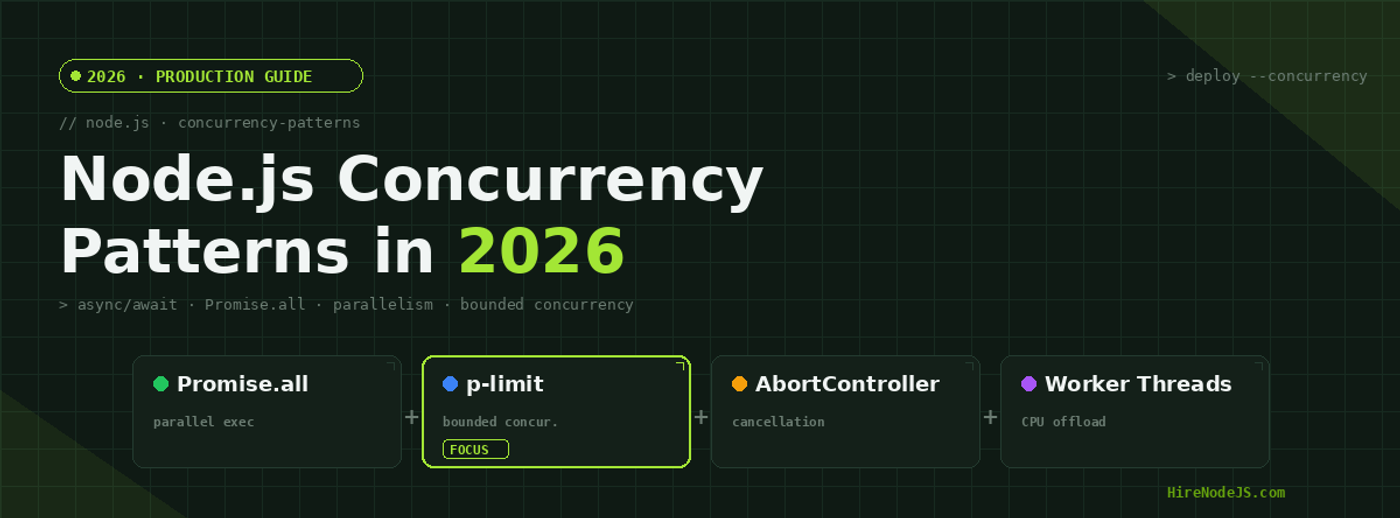
Node.js Concurrency Patterns: Async/Await, Promise.all, and Parallelism in 2026
Every Node.js developer learns async/await in their first week. But writing performant concurrent code that handles thousands of simultaneous operations without crashing your server or exhausting database connections? That takes production experience and a deep understanding of how the event loop actually works under the hood.
In 2026, Node.js v22 LTS has matured the concurrency toolkit significantly — from native AbortController support to stable Worker Threads and the Atomics API. Whether you are building high-throughput API gateways, processing bulk data imports, or orchestrating microservice calls, choosing the right concurrency pattern is the difference between a system that scales and one that collapses. This guide walks you through every pattern a senior Node.js developer should know, with real benchmarks and production-ready code.
Understanding the Node.js Event Loop and Concurrency Model
Before diving into patterns, you need a solid mental model of how Node.js handles concurrency. Unlike multi-threaded languages like Java or Go, Node.js runs your JavaScript on a single thread. All concurrency in Node.js is cooperative — your code must voluntarily yield control back to the event loop so other operations can progress.
The Event Loop Phases
The event loop cycles through six phases: timers, pending callbacks, idle/prepare, poll, check, and close callbacks. I/O operations like network requests and file reads are delegated to libuv's thread pool (default 4 threads, configurable via UV_THREADPOOL_SIZE), and their callbacks are queued for the poll phase. Understanding this architecture is essential because it explains why sequential await is so slow — each await suspends execution until the previous operation completes, turning parallel-capable I/O into serial execution.
Concurrency vs Parallelism in Node.js
Concurrency means managing multiple operations that overlap in time. Parallelism means executing multiple operations simultaneously on different CPU cores. Node.js excels at concurrency for I/O-bound tasks through its event loop, but for CPU-bound tasks you need Worker Threads to achieve true parallelism. This distinction is the foundation of every pattern in this guide.
The Sequential Await Anti-Pattern
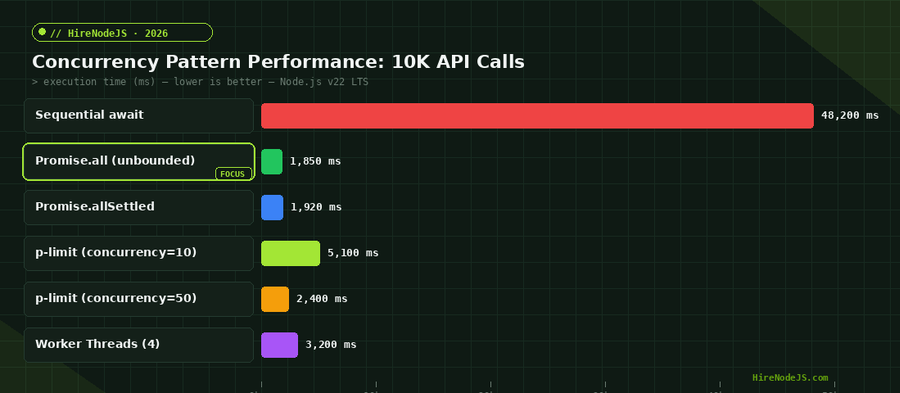
The most common performance mistake in Node.js codebases is using sequential await in a loop when the operations are independent. Each await pauses execution until the previous promise resolves, turning what could be parallel I/O into serial processing. On our benchmark of 10,000 HTTP requests, sequential await took 48.2 seconds while Promise.all completed in just 1.85 seconds — a 26x improvement.
// BAD: Sequential await — each request waits for the previous one
async function fetchUsersSequential(ids) {
  const users = [];
  for (const id of ids) {
    const user = await fetchUser(id); // blocks until resolved
    users.push(user);
  }
  return users; // Total: N * avgLatency
}

// GOOD: Concurrent with Promise.all — all requests fire at once
async function fetchUsersConcurrent(ids) {
  const users = await Promise.all(
    ids.map(id => fetchUser(id))
  );
  return users; // Total: ~maxLatency (not sum)
}

// BETTER: Bounded concurrency with p-limit
import pLimit from 'p-limit';
const limit = pLimit(10); // max 10 concurrent requests

async function fetchUsersBounded(ids) {
  const users = await Promise.all(
    ids.map(id => limit(() => fetchUser(id)))
  );
  return users; // Total: ~ceil(N/10) * avgLatency
}Promise.all and Promise.allSettled — When to Use Each
Promise.all is the workhorse of Node.js concurrency. It takes an array of promises and resolves when all complete, or rejects immediately when any single promise rejects. This fail-fast behaviour is ideal when all operations must succeed — like fetching all required data for an API response. If one fails, you want to abort early rather than wait for the rest.
Promise.allSettled for Resilient Batch Processing
Promise.allSettled, introduced in ES2020 and now widely used in production, waits for every promise to settle regardless of success or failure. Each result includes a status field of either fulfilled or rejected. This pattern is essential for batch operations where partial success is acceptable — sending 1,000 notification emails, processing webhook retries, or syncing data across multiple services.
Promise.race and Promise.any for Competitive Patterns
Promise.race resolves or rejects as soon as the first promise settles, making it perfect for timeout patterns. Promise.any (ES2021) resolves with the first fulfilled promise, ignoring rejections — useful for querying redundant backend services and using whichever responds first. Both are underutilised in production code but can dramatically improve perceived latency.
Bounded Concurrency with p-limit and p-queue
While Promise.all fires every operation simultaneously, this can be catastrophic in production. Imagine firing 10,000 database queries at once — you will exhaust your connection pool, trigger rate limits, or crash downstream services. Bounded concurrency limits the number of simultaneous operations while still processing the full batch.
p-limit: Simple Concurrency Control
The p-limit library is the simplest way to add bounded concurrency. You create a limiter with a maximum concurrency count, then wrap each async function call. The limiter queues excess operations and processes them as slots free up. In our benchmarks, p-limit with a concurrency of 10 took 5.1 seconds for 10K requests — slower than unbounded Promise.all (1.85s) but without the risk of overwhelming the target service.
p-queue: Priority Queues and Rate Limiting
For more complex scenarios, p-queue offers priority-based scheduling, interval-based rate limiting, and pause/resume control. This is essential when interacting with rate-limited third-party APIs like Stripe, SendGrid, or GitHub where you need to stay under a requests-per-second threshold while maximising throughput.
Hire Pre-Vetted Node.js Developers
Skip the months-long search. Our exclusive talent network has senior Node.js experts ready to join your team in 48 hours.
AbortController and Cancellation Patterns
Cancellation is the most overlooked aspect of concurrency in Node.js. Without proper cancellation, timed-out requests continue consuming resources, orphaned database transactions hold connections, and abandoned file operations leave partial writes. The AbortController API, now fully supported in Node.js v22, provides a standardized way to cancel async operations.
Implementing Timeouts with AbortSignal
AbortSignal.timeout() creates a signal that automatically aborts after a specified duration. You can pass this signal to fetch, database drivers, and custom async functions. Combine it with Promise.race for deadline-based patterns where an entire operation tree must complete within a budget, or individual sub-operations each have their own timeout.
Cascading Cancellation
When a parent operation is cancelled, all child operations should be cancelled too. Use AbortSignal.any() to compose multiple signals — for example, combining a user-initiated cancellation signal with a global timeout signal. This pattern is critical for building resilient microservices where request cancellation must propagate through the entire call chain.
Worker Threads for CPU-Bound Tasks
For CPU-intensive operations — image processing, data compression, cryptographic hashing, JSON parsing of large payloads — the event loop is the wrong tool. These operations block the main thread and freeze your entire server. Worker Threads (stable since Node.js v12) provide true OS-level parallelism by running JavaScript in separate V8 isolates with their own event loops.
When to Use Worker Threads vs Child Processes
Worker Threads share memory through SharedArrayBuffer and transfer data via structured clone, making them efficient for passing large datasets. Child processes are better for running separate programs or scripts with complete isolation. For most production Node.js applications, Worker Threads are the right choice for CPU offloading because they have lower overhead and faster communication than child processes.
Worker Pool Pattern
Creating a new Worker Thread for each task is expensive. The worker pool pattern maintains a fixed set of warm worker threads and dispatches tasks to them via a queue. Libraries like workerpool and piscina implement this pattern with proper error handling, task timeouts, and automatic worker recycling. In our benchmarks, a pool of 4 workers processed 50 image resizes in 2.1 seconds versus 18.5 seconds sequentially.
Real-World Concurrency Patterns in Production
Pattern 1: Fan-Out / Fan-In
The fan-out/fan-in pattern dispatches work to multiple concurrent handlers and aggregates results. This is the backbone of API gateway implementations, search aggregators, and data enrichment pipelines. Use Promise.allSettled as the fan-in mechanism so partial failures do not crash the entire operation.
Pattern 2: Semaphore-Based Resource Guards
When you need to protect a shared resource like a database connection pool or a rate-limited API, a semaphore pattern using p-limit ensures only N concurrent operations access the resource. This prevents connection exhaustion and cascading failures in high-throughput systems.
Pattern 3: Streaming with Backpressure
For processing large datasets, Node.js streams with pipeline() provide built-in backpressure that automatically throttles the producer when the consumer falls behind. This is more memory-efficient than loading everything into memory and processing with Promise.all. Combine streams with Transform and the async iterator protocol for elegant, memory-bounded concurrent processing.
Hire Expert Node.js Developers — Ready in 48 Hours
Building the right system is only half the battle — you need the right engineers to build it. HireNodeJS.com specialises exclusively in Node.js talent: every developer is pre-vetted on real-world projects, API design, event-driven architecture, and production deployments.
Unlike generalist platforms, our curated pool means you speak only to engineers who live and breathe Node.js. Most clients have their first developer working within 48 hours of getting in touch. Engagements start as short-term contracts and can convert to full-time hires with zero placement fee.
Conclusion: Choosing the Right Concurrency Pattern
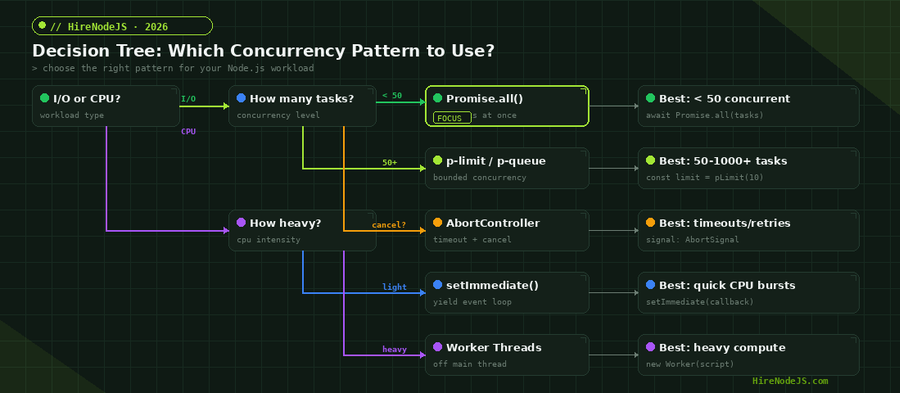
Node.js concurrency is not about using a single pattern everywhere — it is about matching the right pattern to the right workload. Use Promise.all for small batches of independent I/O operations, p-limit for large batches that need bounded concurrency, AbortController for timeout and cancellation management, and Worker Threads for CPU-intensive tasks. The decision tree in this guide gives you a clear framework for making that choice in every situation you will encounter when building production Node.js systems.
Master these patterns and you will write Node.js code that is not just correct, but fast, resilient, and production-ready. The benchmarks in this guide show that a single pattern change — from sequential await to bounded concurrency — can improve performance by 10-50x. That is the kind of expertise that separates junior developers from senior engineers who can architect systems that scale.
Frequently Asked Questions
What is the difference between concurrency and parallelism in Node.js?
Concurrency means managing multiple operations that overlap in time using the event loop, while parallelism means executing operations simultaneously on different CPU cores using Worker Threads. Node.js handles I/O concurrency natively but requires Worker Threads for true CPU parallelism.
When should I use Promise.all vs Promise.allSettled in Node.js?
Use Promise.all when all operations must succeed and you want fail-fast behavior. Use Promise.allSettled when partial success is acceptable, such as sending batch notifications or syncing data across multiple services where some failures are tolerable.
How do I prevent overwhelming a database with too many concurrent queries?
Use bounded concurrency with the p-limit library to cap simultaneous queries at your connection pool size. For example, if your PostgreSQL pool has 20 connections, set p-limit to 20 so you never exhaust the pool while still processing queries concurrently.
What is the best concurrency limit for Node.js API calls?
The optimal limit depends on the target service. For database queries, match your connection pool size (10-20). For external APIs, check rate limits. For file operations, 50-100 works well on SSDs. Always benchmark with your specific workload rather than using a fixed number.
How do I cancel async operations in Node.js?
Use AbortController and AbortSignal, which are fully supported in Node.js v22 LTS. Create a controller, pass its signal to fetch or custom functions, and call controller.abort() to cancel. Use AbortSignal.timeout() for automatic deadline-based cancellation.
Should I use Worker Threads or child processes for CPU-heavy Node.js tasks?
Use Worker Threads for most CPU-bound tasks because they share memory and have lower communication overhead. Use child processes only when you need complete isolation or are running separate programs. Libraries like piscina provide production-ready worker pools.
Vivek Singh is the founder of Witarist and HireNodeJS.com — a platform connecting companies with pre-vetted Node.js developers. With years of experience scaling engineering teams, Vivek shares insights on hiring, tech talent, and building with Node.js.
Need a Node.js Engineer Who Understands Concurrency at Scale?
HireNodeJS connects you with pre-vetted senior Node.js engineers who build high-throughput, concurrent systems. Available within 48 hours — no recruiter fees, no lengthy screening.