Node.js + OpenAI: Build Production AI Agents in 2026
Generative AI moved from novelty to default infrastructure in 2025, and by 2026 every serious backend team is shipping an LLM-powered feature of some kind — chat assistants, document Q&A, autonomous agents that file tickets or run reports, copilots inside SaaS dashboards. The vast majority of those backends are Node.js. The combination of async I/O, the npm ecosystem, and TypeScript's strict generics makes Node the most pleasant runtime for talking to OpenAI, Anthropic, Google, and the new wave of open-source providers.
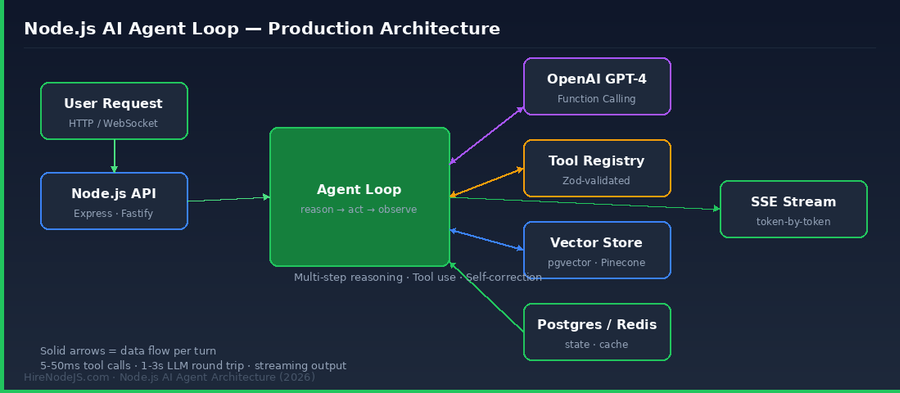
This guide walks through everything a Node.js team needs to ship a production AI agent in 2026: streaming the OpenAI SDK from Express or Fastify, defining tools with Zod, building a multi-step reason-and-act loop, wiring up memory with pgvector, handling cost and rate limits, and hardening the system against prompt injection. If you want to go deeper on the runtime itself, our Node.js skill page covers what a senior engineer should know before they touch an agent codebase.
Why Node.js Is the Default Runtime for AI Agents in 2026
Three things make Node the natural home for LLM agents. First, the event loop is built for waiting on slow I/O — and a 2-second LLM round trip is the slowest I/O you have. While the model thinks, your process can serve hundreds of other requests. Python has caught up with asyncio, but Node still wins on raw throughput per CPU core for I/O-bound agent workloads.
The async event loop matches LLM workloads
An agent spends 95% of its wall-clock time blocked on the model. With Node's single-threaded event loop, a single Express process on a 2 vCPU container can comfortably hold 500 concurrent agent sessions without breaking a sweat. The same workload in synchronous Python (Flask + gunicorn workers) typically needs 4–6× the memory because each blocked request pins a worker thread.
TypeScript gives you Zod-validated tool schemas for free
OpenAI's function-calling API expects each tool described as a JSON Schema. In TypeScript you write a Zod schema once and use zod-to-json-schema to derive the OpenAI tool definition, while still keeping a fully-typed input parameter object inside the tool handler. Python equivalents exist (Pydantic + instructor) but the TypeScript story has fewer moving parts and faster cold starts on serverless.
The npm ecosystem ships first
OpenAI, Anthropic, Mistral, Cohere, and Google all publish a TypeScript SDK that lands within hours of a new model release. The Vercel AI SDK, LangChain.js, LlamaIndex.TS, and Mastra cover higher-level abstractions. If you are hiring a backend developer for an AI feature this year, Node.js + TypeScript fluency is the safest default skill set on the market.
Setting Up the OpenAI SDK and Streaming Responses
Skip the wrappers for now. The official openai npm package gives you everything you need to build a real agent — chat completions, function calling, structured outputs, streaming, and the new Responses API. Add a thin layer of your own code on top and you understand exactly what is happening on every turn.
Install and configure
Pin the SDK to a known minor version, store the key in an environment variable, and never instantiate the client inside a request handler — create one shared client at module load and reuse it. The SDK uses an HTTP keep-alive agent that pools connections to api.openai.com, which shaves 100–200ms off each call.
npm install openai zod zod-to-json-schema
npm install -D @types/node typescript// src/openai.ts — single shared client, used everywhere
import OpenAI from 'openai';
if (!process.env.OPENAI_API_KEY) {
throw new Error('OPENAI_API_KEY is required');
}
export const openai = new OpenAI({
apiKey: process.env.OPENAI_API_KEY,
// Retry transient 5xx and 429s with exponential backoff
maxRetries: 3,
timeout: 60_000,
});
// A streaming chat call that yields tokens to the caller
export async function* streamReply(messages: OpenAI.ChatCompletionMessageParam[]) {
const stream = await openai.chat.completions.create({
model: 'gpt-4o-mini',
messages,
stream: true,
temperature: 0.2,
});
for await (const chunk of stream) {
const delta = chunk.choices[0]?.delta?.content;
if (delta) yield delta;
}
}Function Calling — How Agents Actually Use Tools
Function calling is the single most important capability a modern LLM exposes. You describe the tools you have — search the docs, fetch a customer record, send an email, run SQL — and the model returns structured JSON telling you which tool to invoke and with what arguments. Your code runs the tool, feeds the result back, and the model decides what to do next.
Define tools with Zod, derive the schema for free
import { z } from 'zod';
import { zodToJsonSchema } from 'zod-to-json-schema';

const SearchOrders = z.object({
  customerId: z.string().describe('UUID of the customer'),
  status: z.enum(['pending', 'shipped', 'delivered', 'returned']).optional(),
  limit: z.number().int().min(1).max(50).default(10),
});

export const tools = [
  {
    type: 'function' as const,
    function: {
      name: 'search_orders',
      description: 'Look up recent orders for a given customer.',
      parameters: zodToJsonSchema(SearchOrders, { target: 'openAi' }),
    },
  },
];

export const handlers = {
  async search_orders(raw: unknown) {
    const args = SearchOrders.parse(raw); // throws on bad input
    return db.orders.findMany({
      where: { customerId: args.customerId, status: args.status },
      take: args.limit,
    });
  },
};
The reason → act → observe loop
An agent is a while loop that keeps calling the model until the model stops asking for tools and gives a final answer. Cap the iterations to something like 10 — runaway loops are the most common cause of surprise OpenAI bills in production.
import { openai } from './openai';
import { tools, handlers } from './tools';
import type OpenAI from 'openai';

export async function runAgent(userMessage: string) {
  const messages: OpenAI.ChatCompletionMessageParam[] = [
    { role: 'system', content: 'You are a customer support agent. Use tools to look up real data.' },
    { role: 'user', content: userMessage },
  ];

  for (let step = 0; step < 10; step++) {
    const completion = await openai.chat.completions.create({
      model: 'gpt-4o-mini', messages, tools, tool_choice: 'auto',
    });
    const msg = completion.choices[0].message;
    messages.push(msg);

    if (!msg.tool_calls) return msg.content;

    for (const call of msg.tool_calls) {
      const fn = (handlers as any)[call.function.name];
      const result = fn
        ? await fn(JSON.parse(call.function.arguments))
        : { error: `Unknown tool ${call.function.name}` };
      messages.push({
        role: 'tool', tool_call_id: call.id,
        content: JSON.stringify(result),
      });
    }
  }
  throw new Error('Agent exceeded max iterations');
}
Building Memory — Short-Term Context and Long-Term Recall
Out of the box an LLM has no memory. Every turn must arrive with the full conversation in the messages array. That works fine for short chats; once a session goes past 30–40 turns you need a real memory strategy or you will blow through the context window and your token budget.
Hire Pre-Vetted Node.js Developers
Skip the months-long search. Our exclusive talent network has senior Node.js experts ready to join your team in 48 hours.
Short-term: rolling window with summarisation
Keep the last N turns verbatim and replace older turns with a single AI-generated summary. A 6-message rolling window plus a 200-token rolling summary is cheap and works for almost every assistant use case. Run the summary update in the background so it never blocks user-visible latency.
Long-term: embeddings and pgvector
For knowledge that must persist across sessions — past tickets, document chunks, the user's stated preferences — embed each piece of text with text-embedding-3-small, store it in Postgres with the pgvector extension, and retrieve the top-k most relevant chunks before each LLM call. If you are already running PostgreSQL you do not need a separate vector database for the first million records — pgvector with HNSW indexes performs beautifully up to that scale.
Production Concerns — Cost, Latency, and Reliability
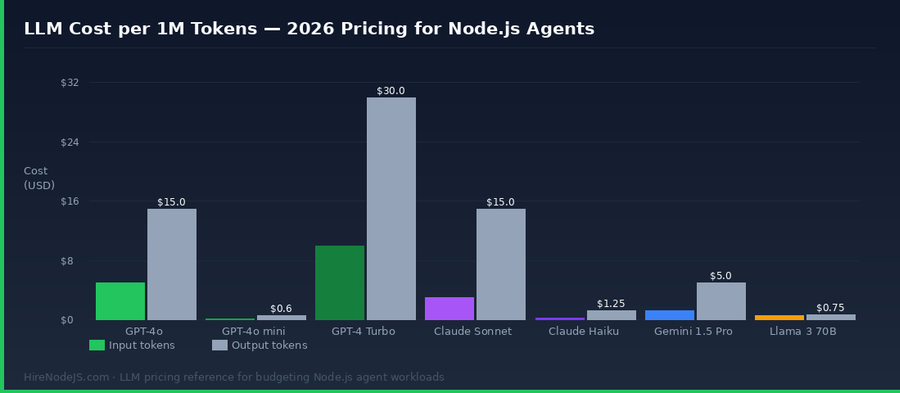
Most agent demos work. Most agent products in production fail on cost, latency, or both. Treat the LLM call like the most expensive line in your API and design backwards from there.
Token budgets and rate limits
Set a hard token budget per session and refuse the request if a single turn would exceed it. Track cumulative spend per user in Redis and alert on outliers. OpenAI's tier 4 rate limit (10M TPM, 30k RPM) sounds generous until one buggy loop burns through it in 90 seconds.
Streaming with Server-Sent Events
Users tolerate a 4-second response if they see tokens stream within 400ms. They abandon a 2-second response if it arrives as a single block at the end. Use SSE (or WebSockets if you also need bidirectional events) to push tokens to the client as they arrive from OpenAI. Express handles SSE with a few lines:
import express from 'express';
import { streamReply } from './openai';

const app = express();
app.use(express.json());

app.post('/chat', async (req, res) => {
  res.setHeader('Content-Type', 'text/event-stream');
  res.setHeader('Cache-Control', 'no-cache, no-transform');
  res.setHeader('Connection', 'keep-alive');
  res.flushHeaders();

  try {
    for await (const token of streamReply(req.body.messages)) {
      res.write(`data: ${JSON.stringify({ token })}\n\n`);
    }
    res.write('data: [DONE]\n\n');
  } catch (err) {
    res.write(`event: error\ndata: ${JSON.stringify({ message: String(err) })}\n\n`);
  } finally {
    res.end();
  }
});
Observability is non-negotiable
Send every prompt, completion, token count, and cost to a tracing tool — Helicone, Langfuse, LangSmith, or roll your own with OpenTelemetry. You cannot debug an agent in production without the full prompt history of failing turns. Sample 100% of errors and 1% of successes; that is enough to understand drift over time.
Security Hardening for LLM Agents in Production
An agent that can call tools is an agent that can be tricked into calling tools the wrong way. Prompt injection is the SQL injection of the 2020s — every input that ends up in a prompt must be treated as hostile.
Validate every tool input — twice
The Zod parse inside each tool handler is your floor, not your ceiling. Add business-rule checks on top: a customer-support agent should not be able to call refund_order with a customerId different from the authenticated user. Authorise tools against the session, not against the LLM's stated intent.
Sandbox dangerous tools and require human approval
Any tool that mutates state — sending email, charging a card, deleting data — should write to an audit log and, for high-risk actions, return a 'pending approval' status that requires a human to confirm in the UI. The audit pattern is straightforward to build with the same Postgres database your app already uses; we cover related production patterns in our how it works page if you want to see the development model that goes with it.
Hire Expert Node.js Developers — Ready in 48 Hours
Building an AI agent is the easy half. The hard half is wiring it into a real product — auth, billing, tenancy, observability, on-call. HireNodeJS.com specialises exclusively in Node.js talent: every developer has shipped production APIs, integrated third-party services, and operated systems under load. We pre-vet on real-world projects, not whiteboard puzzles.
Unlike generalist platforms, our curated pool means you talk only to engineers who live and breathe Node.js. Most clients have their first developer working within 48 hours of getting in touch, and engagements start as short-term contracts that can convert to full-time hires with zero placement fee.
Wrapping Up — The 2026 Playbook
Production-ready Node.js agents are an eight-piece puzzle: the OpenAI SDK with a shared keep-alive client, Zod-validated tools, a bounded reason-act-observe loop, rolling-window plus pgvector memory, SSE streaming to the client, per-session token budgets, observability with full prompt traces, and prompt-injection defences on every input. Skip any one and you will discover the gap in production at the worst possible time.
Start with the smallest version that works — one tool, gpt-4o-mini, no memory. Watch the trace dashboard for the first 100 real conversations. The pattern of failure tells you exactly where to invest next, and you avoid building infrastructure for problems you do not have. The teams shipping the best agents in 2026 are the ones who treat the LLM as a regular external dependency: timeouts, retries, observability, cost caps. Nothing magical.
Frequently Asked Questions
Which Node.js framework is best for building AI agents in 2026?
Express and Fastify both work well — pick Fastify if raw throughput matters, Express if your team already knows it. The framework matters far less than how you structure the agent loop, your tool definitions, and your memory strategy.
Should I use LangChain.js or call the OpenAI SDK directly?
Start with the raw OpenAI SDK plus Zod for tool schemas. You will understand exactly what is happening on every turn and your bundle stays tiny. Reach for LangChain.js or Vercel AI SDK only when you need their specific abstractions like multi-provider routing or pre-built RAG components.
How much does it cost to run a Node.js AI agent in production?
A typical customer-support agent on gpt-4o-mini costs $0.001 to $0.005 per conversation. With caching, summarisation, and routing simple turns to cheaper models, even a busy SaaS app rarely exceeds $200 per month per 1,000 monthly active users.
Do I need a separate vector database for AI agent memory?
Not initially. Postgres with the pgvector extension handles up to a few million embeddings comfortably with HNSW indexes. Move to Pinecone, Weaviate, or Qdrant only when you outgrow that or need features like hybrid search at scale.
How do I prevent prompt injection in a Node.js agent?
Wrap all untrusted text (user input, retrieved documents, tool results) in clear delimiters and re-state the system role. Authorise every tool call against the authenticated session, never against the LLM’s stated intent. Treat agents that mutate state as requiring human approval for high-risk actions.
Where can I hire Node.js developers experienced with OpenAI and AI agents?
HireNodeJS.com specialises in pre-vetted Node.js engineers, including developers experienced with OpenAI, function calling, vector databases and production LLM deployments. Most clients are matched with a developer within 48 hours.
Vivek Singh is the founder of Witarist and HireNodeJS.com — a platform connecting companies with pre-vetted Node.js developers. With years of experience scaling engineering teams, Vivek shares insights on hiring, tech talent, and building with Node.js.
Need a Node.js engineer who can ship AI features?
HireNodeJS connects you with pre-vetted senior Node.js engineers experienced with OpenAI, vector databases, and production agent deployments — available within 48 hours, no recruiter fees.