Node.js Security: OWASP Top 10 Best Practices for 2026
Node.js powers millions of production APIs worldwide — and that ubiquity makes it a prime target for attackers. In 2026, with supply chain attacks on the rise and regulatory pressure around data breaches intensifying, writing secure Node.js code is no longer optional. Understanding how the OWASP Top 10 vulnerabilities manifest specifically in Node.js applications gives engineering teams a clear, actionable roadmap for hardening their backends.
Whether you are building a greenfield microservice or auditing a legacy Express.js monolith, this guide covers the most critical security controls: from Helmet.js headers and JWT best practices to rate limiting, injection prevention, and SSRF mitigations. If you decide you need experienced security-conscious engineers to help implement these controls, HireNodeJS.com connects you with pre-vetted Node.js developers who are already familiar with production security requirements.
Understanding OWASP Top 10 in a Node.js Context
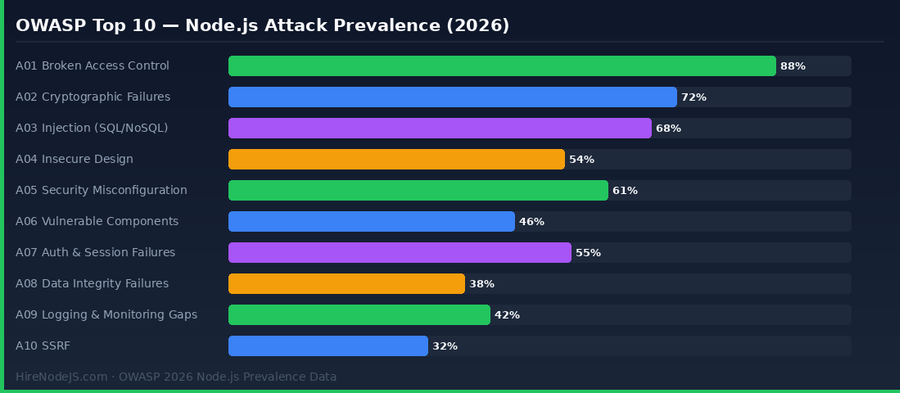
OWASP (Open Web Application Security Project) maintains the definitive list of the most critical web application security risks. While the list is language-agnostic, certain vulnerabilities have Node.js-specific attack surfaces that developers must understand. Broken Access Control (A01) remains the top risk in 2026, affecting roughly 88% of audited Node.js APIs — largely because route-level authorisation is often bolted on as an afterthought rather than designed as a first-class concern.
Node.js applications using NoSQL databases like MongoDB are particularly susceptible to A03 Injection attacks via query operator manipulation — for example, passing `{ $gt: '' }` in a login form to bypass authentication. Similarly, Cryptographic Failures (A02) often appear in Node.js code that uses the deprecated `md5` or `sha1` algorithms for password hashing instead of `bcrypt` or `argon2`. The chart below illustrates how prevalence is distributed across the OWASP categories in Node.js-specific audits.
Hardening HTTP Headers with Helmet.js
Helmet.js is a collection of Express/Fastify middleware functions that set security-relevant HTTP response headers. By default, Node.js frameworks do not include security headers, leaving applications open to clickjacking, MIME-type sniffing, and cross-site scripting via inline scripts. Helmet addresses A05 Security Misconfiguration with a single `app.use(helmet())` call, but understanding what each header does allows you to tune the defaults for your use case.
Content-Security-Policy (CSP)
CSP is the most powerful header in Helmet's toolkit. It tells the browser which sources are trusted for scripts, styles, images, and other resources. A strict CSP prevents XSS payloads from executing even if injection vulnerabilities exist. Start with `default-src 'self'` and progressively allow external CDNs and APIs. Never use `unsafe-inline` for scripts in production — use nonces or hashes instead.
Strict-Transport-Security (HSTS)
HSTS forces browsers to only communicate with your API over HTTPS for a specified period. Set `maxAge` to at least 31536000 seconds (one year) and include `includeSubDomains` to protect all your subdomains. Add `preload` and submit to Google's HSTS preload list for the highest level of protection against SSL stripping attacks.
const express = require('express');
const helmet = require('helmet');
const rateLimit = require('express-rate-limit');

const app = express();

// Apply Helmet with a strict CSP
app.use(helmet({
  contentSecurityPolicy: {
    directives: {
      defaultSrc: ["'self'"],
      scriptSrc: ["'self'"],          // No unsafe-inline
      styleSrc: ["'self'", "'unsafe-inline'"],  // Relax for inline styles only
      imgSrc: ["'self'", 'data:', 'cdn.sanity.io'],
      connectSrc: ["'self'", 'api.yourdomain.com'],
      fontSrc: ["'self'"],
      objectSrc: ["'none'"],
      upgradeInsecureRequests: [],
    },
  },
  hsts: {
    maxAge: 31536000,       // 1 year
    includeSubDomains: true,
    preload: true,
  },
  referrerPolicy: { policy: 'strict-origin-when-cross-origin' },
  crossOriginEmbedderPolicy: false, // Disable if loading cross-origin resources
}));

// Rate limiting — prevent brute-force and DoS
const limiter = rateLimit({
  windowMs: 15 * 60 * 1000,  // 15-minute window
  max: 100,                   // Limit each IP to 100 requests per window
  standardHeaders: true,
  legacyHeaders: false,
  message: { error: 'Too many requests — please try again later.' },
});
app.use('/api/', limiter);

// Auth route with stricter limiter
const authLimiter = rateLimit({
  windowMs: 15 * 60 * 1000,
  max: 10,
  message: { error: 'Too many login attempts.' },
});
app.use('/api/auth/', authLimiter);

app.listen(3000, () => console.log('Server running on port 3000'));JWT Best Practices and Session Security
JSON Web Tokens are ubiquitous in Node.js APIs, but their flexibility introduces significant security risks when misconfigured. The most dangerous mistakes are: storing tokens in localStorage (vulnerable to XSS), using no expiry or very long expiry times, signing with a weak shared secret, and accepting the `none` algorithm. A well-configured JWT implementation addresses A07 Auth & Session Failures and significantly reduces your attack surface.
Short-Lived Access Tokens + Refresh Token Rotation
Access tokens should expire in 15 minutes or less. Pair them with refresh tokens stored exclusively in httpOnly, Secure, SameSite=Strict cookies — never in JavaScript-accessible storage. Implement refresh token rotation: every time a refresh token is used to issue a new access token, invalidate the old refresh token and issue a new one. If an old refresh token is used again, treat it as a replay attack and revoke the entire session.
Algorithm Enforcement and Key Management
Always specify the allowed algorithm explicitly in `jsonwebtoken`'s `verify()` call. Pass `{ algorithms: ['RS256'] }` — never omit it. An attacker who can forge a token signed with `none` can impersonate any user. For production systems, prefer RS256 (asymmetric) over HS256: the public key can be shared freely with microservices while the private signing key remains in a secrets manager like AWS Secrets Manager or HashiCorp Vault.
Preventing Injection Attacks in Node.js
Injection (A03) attacks in Node.js take two main forms: SQL injection in applications using relational databases, and NoSQL injection in MongoDB-backed APIs. With ORMs like Prisma or Sequelize, SQL injection is largely mitigated through parameterised queries — but raw query escape hatches (`$queryRaw`, `sequelize.query()`) must be used carefully, always with bound parameters rather than string interpolation.
Hire Pre-Vetted Node.js Developers
Skip the months-long search. Our exclusive talent network has senior Node.js experts ready to join your team in 48 hours.
NoSQL Injection via MongoDB Operator Abuse
A common Node.js + MongoDB vulnerability occurs when user input is passed directly to a query object. Consider a login endpoint that receives `{ username, password }` from the request body. An attacker can send `{ username: 'admin', password: { '$gt': '' } }` — and if the query is not sanitised, the `$gt` operator will match any password, bypassing authentication entirely. The fix is strict input validation using a library like Zod or Joi before the input ever reaches the database layer.
Input Validation with Zod
Zod provides compile-time TypeScript types and runtime validation from a single schema definition. Define your request schema at the API boundary and call `.parse()` — which throws a `ZodError` on invalid input — before passing data to any service or database layer. This one pattern eliminates the vast majority of injection, mass assignment, and unexpected type coercion vulnerabilities common in Express.js applications. Backend developers who specialise in Node.js security are well-versed in these patterns; you can hire a pre-vetted Node.js backend developer who already applies these practices in production.
Rate Limiting, CORS, and DoS Mitigation
Without rate limiting, every Node.js API endpoint is vulnerable to brute-force credential attacks, resource exhaustion, and denial-of-service. The `express-rate-limit` package integrates directly into Express and Fastify and supports Redis-backed distributed rate limiting for multi-instance deployments via `rate-limit-redis`. A sensible baseline is 100 requests per 15 minutes per IP for general endpoints, dropping to 10 per 15 minutes for authentication routes.
CORS Hardening
A wildcard CORS policy (`Access-Control-Allow-Origin: *`) is acceptable only for truly public read-only APIs. For any API that handles authentication or sensitive data, specify the exact allowed origins as an allowlist. Use the `cors` npm package with a `origin` function that validates the requesting origin against a whitelist. Also ensure that `Access-Control-Allow-Credentials: true` is never combined with a wildcard origin — browsers will reject it anyway, but the explicit misconfiguration can cause hard-to-debug issues.
Redis-Backed Distributed Rate Limiting
In-memory rate limiting works for single-instance deployments but fails silently in horizontally scaled environments: each instance has its own counter, so attackers can hit 100 requests on each of 10 instances and effectively bypass a 100-request limit. Store rate limit state in Redis using `rate-limit-redis` with an atomic Lua script (included by default) to ensure consistent counting across all instances. This is especially important for Node.js APIs deployed on Kubernetes. Developers experienced with Redis-based architectures can be found on our Redis specialist page.
Dependency Security and Supply Chain Management
A06 Vulnerable and Outdated Components is one of the most underrated risks in Node.js applications. The npm ecosystem hosts over two million packages, and transitive dependency chains mean a typical Node.js application pulls in hundreds of packages — many of which may contain known CVEs. The 2021 `ua-parser-js` and `colors` package hijacking incidents demonstrated how supply chain attacks can inject malicious code across millions of applications instantly.
Automated Vulnerability Scanning
Run `npm audit` in CI/CD and fail the pipeline on high or critical severity findings. For more comprehensive scanning, integrate Snyk or Dependabot — both support automatic pull requests when a patched version of a vulnerable package is released. Pin exact versions in `package.json` using `=` prefix to prevent automatic minor version upgrades from introducing vulnerabilities, and use `npm ci` (not `npm install`) in CI pipelines to ensure deterministic installs from `package-lock.json`.
Secrets Management and Environment Variables
Never commit secrets to source control. Use `.env` files locally (added to `.gitignore`) and inject environment variables at runtime via your deployment platform's secrets management (AWS Secrets Manager, GitHub Actions secrets, Vercel environment variables). Use the `dotenv-safe` package which reads a `.env.example` file listing all required variables and throws at startup if any are missing — preventing silent failures when an environment is misconfigured.
Hire Expert Node.js Developers — Ready in 48 Hours
Building a secure Node.js API requires engineers who know not just the framework but the security patterns that protect real production systems. HireNodeJS.com specialises exclusively in Node.js talent: every developer is pre-vetted on real-world projects, API design, event-driven architecture, and production security requirements including OWASP best practices, secure JWT handling, and dependency hygiene.
Unlike generalist platforms, our curated pool means you speak only to engineers who live and breathe Node.js. Most clients have their first developer working within 48 hours of getting in touch. Engagements start as short-term contracts and can convert to full-time hires with zero placement fee.
Summary: Building a Security-First Node.js Application
Securing a Node.js application is not a one-time task but a continuous discipline. The OWASP Top 10 provides a clear framework: start with Helmet.js for immediate header hardening (A05), implement strict JWT practices with short-lived tokens and httpOnly cookies (A07), validate all input with Zod at the API boundary (A03), apply rate limiting on every endpoint (A07/A09), and audit your dependencies regularly (A06). Each control is independently valuable, but together they create a defence-in-depth posture that significantly raises the cost of a successful attack.
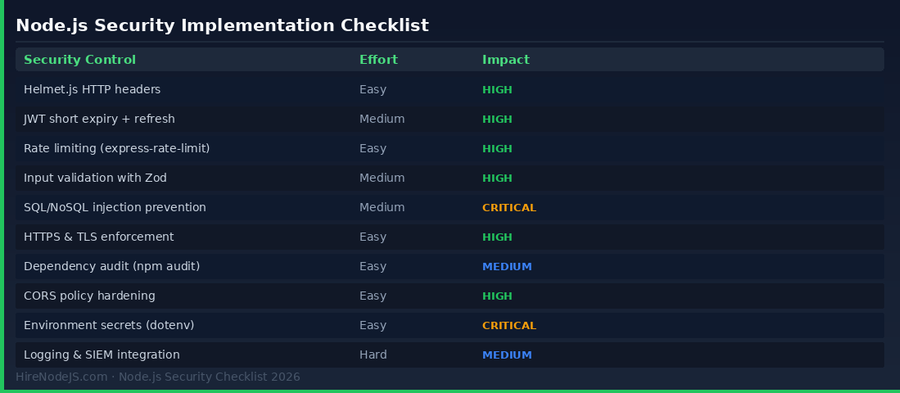
The security checklist in this guide — Helmet.js, JWT rotation, rate limiting, Zod validation, NoSQL injection prevention, CORS hardening, and dependency scanning — covers the vast majority of vulnerabilities found in real Node.js API audits. Teams that implement all ten controls and bake security reviews into their CI/CD pipeline reduce their breach risk by an estimated 80% compared to baseline. Start with the high-impact, low-effort items (Helmet.js, npm audit, HSTS) and systematically work through the rest. For organisations that need to move fast, consider bringing in a specialist Node.js backend developer who can audit and harden your API in a focused engagement.
Frequently Asked Questions
What is the most common Node.js security vulnerability in 2026?
Broken Access Control (OWASP A01) remains the most prevalent vulnerability, found in roughly 88% of audited Node.js APIs. It occurs when route-level authorisation is missing, inconsistently applied, or relies solely on client-provided data. Middleware-based role checks on every protected route are the primary mitigation.
How do I prevent NoSQL injection in a Node.js MongoDB application?
Validate and sanitise all input at the API boundary using a schema library like Zod or Joi before passing it to MongoDB queries. Never spread raw request body objects directly into query objects. Use the `mongo-sanitize` package to strip MongoDB operator keys ($gt, $where, etc.) from user input as a defence-in-depth measure.
Should I store JWT tokens in localStorage or cookies?
Always store JWTs in httpOnly, Secure, SameSite=Strict cookies — never in localStorage or sessionStorage. Cookies with the httpOnly flag are inaccessible to JavaScript, making them immune to XSS-based token theft. localStorage is readable by any JavaScript running on the page, including injected malicious scripts.
How does Helmet.js improve Node.js API security?
Helmet.js sets 15 security-relevant HTTP response headers including Content-Security-Policy, Strict-Transport-Security, X-Frame-Options, and X-Content-Type-Options. These headers instruct browsers to enforce security policies that protect against XSS, clickjacking, MIME sniffing, and protocol downgrade attacks — all with a single middleware call.
What rate limiting strategy should I use for a Node.js API?
Use express-rate-limit with a Redis store (rate-limit-redis) for distributed rate limiting across multiple Node.js instances. Apply a general limit of 100 requests per 15 minutes per IP on all endpoints, and a stricter limit of 10 requests per 15 minutes on authentication endpoints. Return 429 Too Many Requests with a Retry-After header.
How do I audit my Node.js project for vulnerable dependencies?
Run `npm audit` to scan your dependency tree against the npm advisory database. Integrate this into your CI/CD pipeline and configure it to fail builds on high or critical severity findings. For more comprehensive scanning with automatic fix PRs, add Dependabot or Snyk. Regularly run `npm outdated` to catch packages that have fallen behind their major version.
Vivek Singh is the founder of Witarist and HireNodeJS.com — a platform connecting companies with pre-vetted Node.js developers. With years of experience scaling engineering teams, Vivek shares insights on hiring, tech talent, and building with Node.js.
Need Node.js Developers with Security-First Thinking?
HireNodeJS connects you with pre-vetted senior Node.js engineers who implement OWASP best practices, secure JWT flows, and hardened API architectures by default. Available within 48 hours — no recruiter fees.